How invoices are synced to FreeAgent
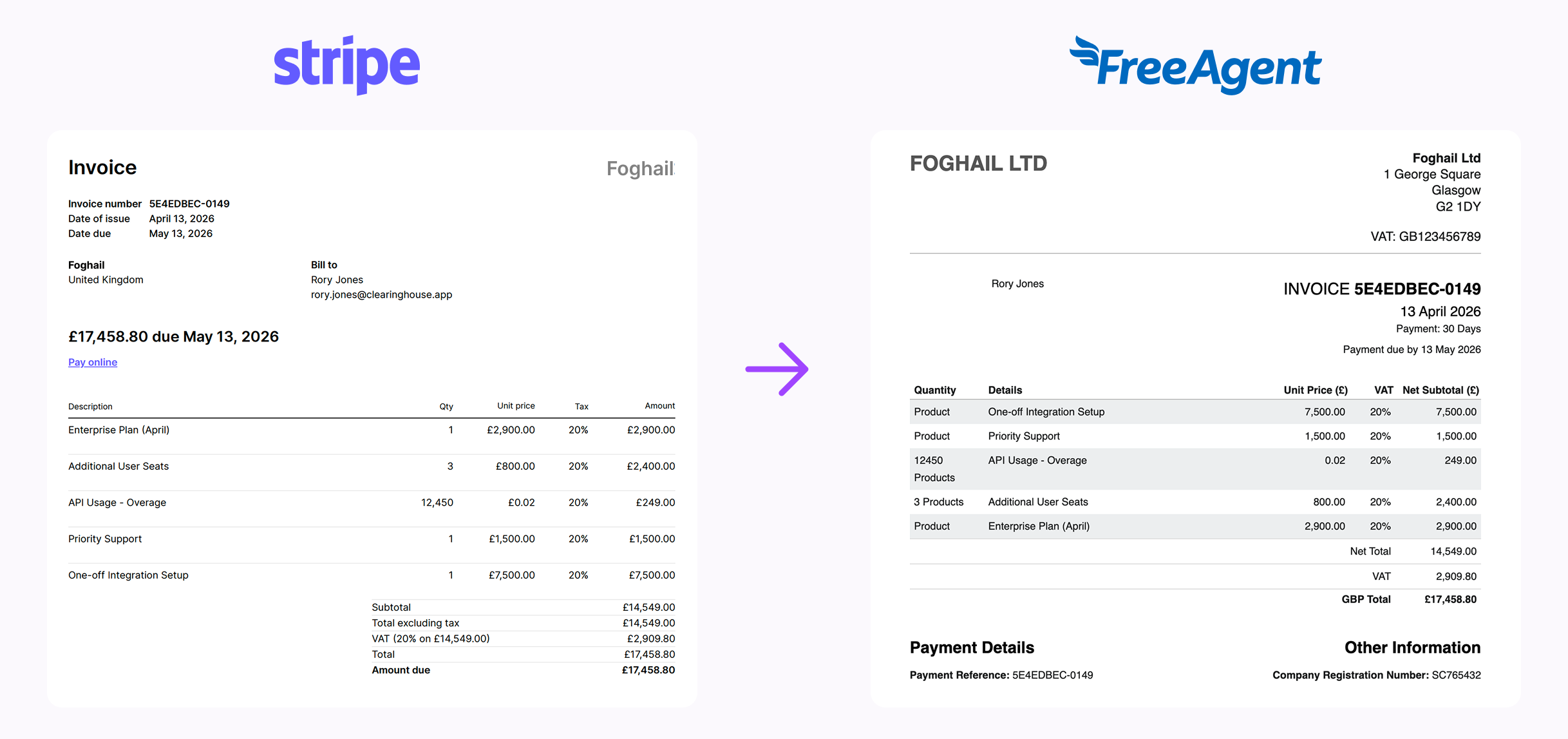
When an invoice is marked as "finalized" in Stripe, ClearingHouse will create a mirror invoice in FreeAgent.
ClearingHouse will copy all of the line items, shipping costs, discounts and taxes to the FA invoice.
Each line item is assigned the category of the first category rule it matches. Lines that don't match a rule are assigned to the default accounting category (001: Income - Sales, unless otherwise configured).
When an invoice is paid, the clearing account transaction will be explained as an Invoice Receipt.
Turning off invoices
If you only want ClearingHouse to keep your clearing account and categories in order, you can untick Create invoices in FreeAgent in your connection's settings.
ClearingHouse then won't create invoices or contacts in FreeAgent. When an invoice is paid, the payment is explained as sales instead, using the categories and VAT rates of the invoice's line items. When the lines are in more than one category or VAT rate, the payment is split between them, with a separate clearing account transaction for each one.
This only applies to invoices synced afterwards. Invoices already in FreeAgent are still marked as paid.
Refunds & Credit Notes
To learn more about how refunds and credit notes are handled, please see Refunds and Credit Notes.

Still stuck? Ask Duncan
Hi, I'm Duncan. I built ClearingHouse, and I'll be the one who replies, usually within a business day.
Help